
Pick-a-Brick (and other tips)
I know you teachers are a committed bunch and spend much of your holiday time thinking about next term and updating your lesson plans. With that in mind, I’d like to give you a little inspiration for your upcoming lessons. If this feels too much like hard work right now, save this blog and come back to it when you’ve finished lazing by the pool.
 1. Have you ever created music using Lego? Use the different sizes and colours of the bricks to create Figurenotes tunes. You can then develop this activity to learn rhythm in standard notation. Maths teachers have been using this method for years!
Did you know that you can buy individual lego bricks? This means you can create a pack directly suited to your needs. All the Figurenotes colours are available from the lego site, just make sure to order all the different sizes you’ll need. This is a great way to teach dotted rhythms, key signatures, and general rhythm reading skills in both Figurenotes and standard notation. You could always put a call out for unused Lego in your local community too.
There are some great templates for Lego music making on Pinterest.
You could create some card versions, either large for whole class work, or small for individuals and small groups. If your pupils are young or have difficulties with motor skills, you might want to start with Duplo.
2. Poly-pockets – you know, those transparent, plastic pockets used in ring-binders – make great miniature whiteboards. Pop a worksheet or empty score inside and use dry-wipe markers to fill them in. You can get dry-wipe markers in Figurenotes colours from IKEA if you want to create a tune or use colour within the worksheet. These poly-pockets can then be wiped clean, ready for the next pupil/class. If possible, it would be amazing to have small magnetic whiteboards for each pupil, but this is a good standby for when budgets are tight.
If you want to share your pupils’ tunes, you can take photos of them and project them using Powerpoint for the whole class to play.
What are the learning points you would like us to create worksheets for? Let us know in the Facebook group: Figurenotes – Let’s Make Music. We want to put many more up in the Resource Base and want them to be relevant to you.
3. Art Attack! You will need: paper plates, masking tape, paints in Figurenotes colours.
There are so many games you can play using just these items, which can then progress further into note naming and reading standard notation. Take a look in the Resource Base, under ‘General’, for the Progression Games sheet. We love games and think they offer brilliant stealth learning opportunities.
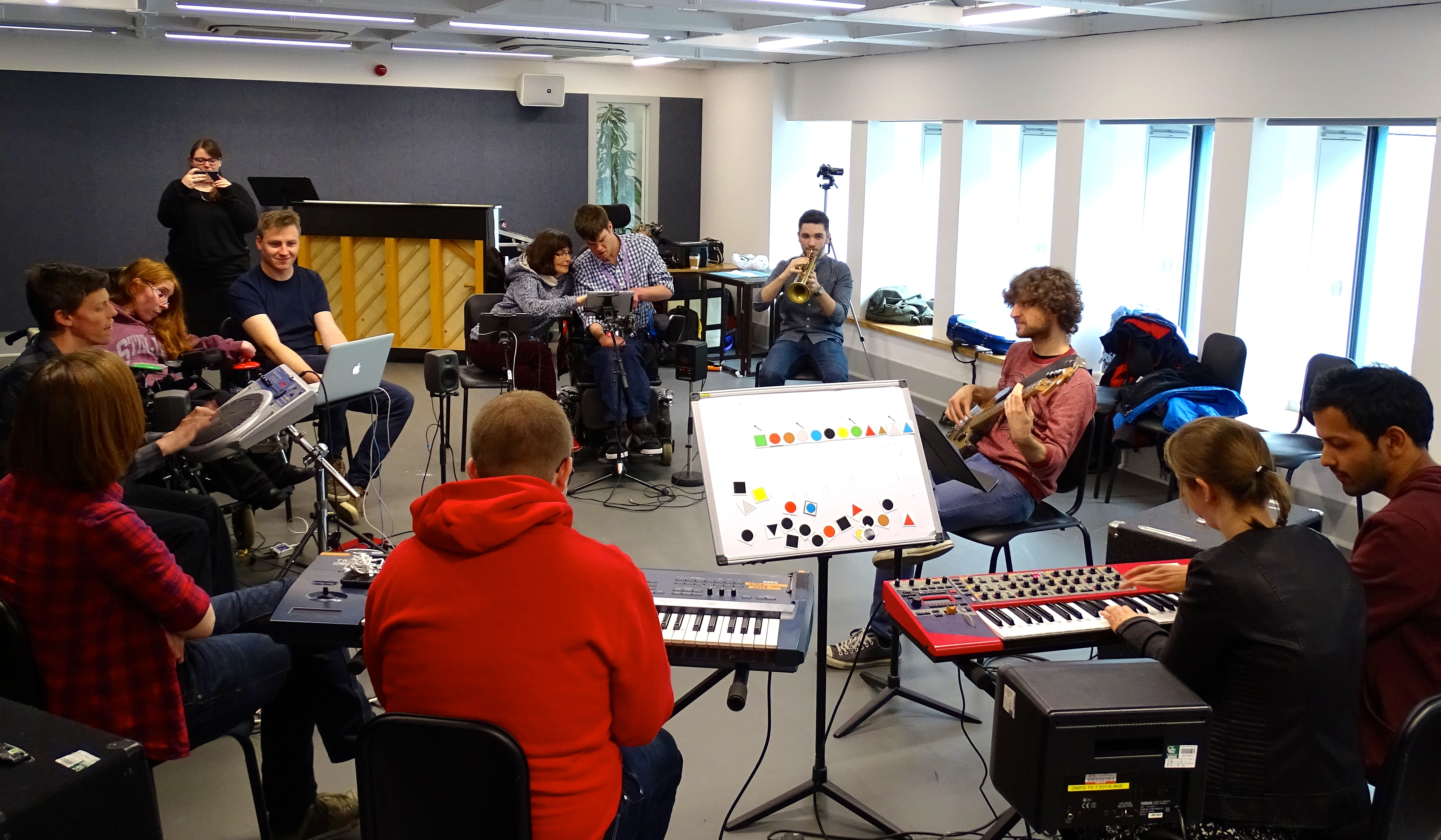
Paint the paper plates in Figurenotes colours – you can either keep them as circles, or cut them to the desired shape. Lay out a Figurenotes score using the masking tape, either on the floor or a table. Start with 4 bars and see if you can compose a tune using your paper plates. Try playing this tune on your instrument.
You can take it to stage 2 by creating a masking tape stave and placing the plates in the appropriate places. Turn this into a quiz or a composition exercise. To take it to stage 3, write the note names on the back of the plates. Place them in the correct positions with the coloured side up. Then get your pupils to name the note before turning the plate over to see if they were correct.
Let us know what other games you would play using these items in the Facebook group: Figurenotes – Let’s Make Music
1. Have you ever created music using Lego? Use the different sizes and colours of the bricks to create Figurenotes tunes. You can then develop this activity to learn rhythm in standard notation. Maths teachers have been using this method for years!
Did you know that you can buy individual lego bricks? This means you can create a pack directly suited to your needs. All the Figurenotes colours are available from the lego site, just make sure to order all the different sizes you’ll need. This is a great way to teach dotted rhythms, key signatures, and general rhythm reading skills in both Figurenotes and standard notation. You could always put a call out for unused Lego in your local community too.
There are some great templates for Lego music making on Pinterest.
You could create some card versions, either large for whole class work, or small for individuals and small groups. If your pupils are young or have difficulties with motor skills, you might want to start with Duplo.
2. Poly-pockets – you know, those transparent, plastic pockets used in ring-binders – make great miniature whiteboards. Pop a worksheet or empty score inside and use dry-wipe markers to fill them in. You can get dry-wipe markers in Figurenotes colours from IKEA if you want to create a tune or use colour within the worksheet. These poly-pockets can then be wiped clean, ready for the next pupil/class. If possible, it would be amazing to have small magnetic whiteboards for each pupil, but this is a good standby for when budgets are tight.
If you want to share your pupils’ tunes, you can take photos of them and project them using Powerpoint for the whole class to play.
What are the learning points you would like us to create worksheets for? Let us know in the Facebook group: Figurenotes – Let’s Make Music. We want to put many more up in the Resource Base and want them to be relevant to you.
3. Art Attack! You will need: paper plates, masking tape, paints in Figurenotes colours.
There are so many games you can play using just these items, which can then progress further into note naming and reading standard notation. Take a look in the Resource Base, under ‘General’, for the Progression Games sheet. We love games and think they offer brilliant stealth learning opportunities.
Paint the paper plates in Figurenotes colours – you can either keep them as circles, or cut them to the desired shape. Lay out a Figurenotes score using the masking tape, either on the floor or a table. Start with 4 bars and see if you can compose a tune using your paper plates. Try playing this tune on your instrument.
You can take it to stage 2 by creating a masking tape stave and placing the plates in the appropriate places. Turn this into a quiz or a composition exercise. To take it to stage 3, write the note names on the back of the plates. Place them in the correct positions with the coloured side up. Then get your pupils to name the note before turning the plate over to see if they were correct.
Let us know what other games you would play using these items in the Facebook group: Figurenotes – Let’s Make Music
 4. 100 Day Practice Challenge – All of my pupils love a challenge, when presented to them as such. If it is just a hard thing to do, then they aren’t playing ball, but as soon as it is a ‘challenge’, they are motivated to try. In order to build good habits and develop practice skills, we need to encourage pupils to practise consistently. The 100 Day Practice Challenge can be a great incentive to build those skills. You can do this in smaller chunks, should you or your pupils prefer, breaking it down to a week to start with and then develop from there. Some teachers create charts or use apps to record the practice sessions. Put landmarks within the timeline, such as gaining a sticker on your chart at 25 days. It is useful to have ideas for practice focus, as well as things to practise when you are away from your instrument. You could even make this competitive within your classroom or studio.
Use one of the Figurenotes 100 Day Challenge maps or create your own. Colour in each shape in a Figurenotes colour to show you have completed your practice for that day. Get a sticker from your teacher every time you reach a number ending in zero. There is a bundle of sheets on the Resource Base, including 2 types of chart and some practice ideas for when you are with and without an instrument – so holidays won’t get in the way of you achieving your goal! Take a look in the Worksheets section.
Not a member of the Resource Base? Get unlimited downloads for a whole year for just £23.99. You also get a discount on our award-winning training days. The next Music Teacher’s Toolbox training is on Saturday 18th November, 2017. Book now!
4. 100 Day Practice Challenge – All of my pupils love a challenge, when presented to them as such. If it is just a hard thing to do, then they aren’t playing ball, but as soon as it is a ‘challenge’, they are motivated to try. In order to build good habits and develop practice skills, we need to encourage pupils to practise consistently. The 100 Day Practice Challenge can be a great incentive to build those skills. You can do this in smaller chunks, should you or your pupils prefer, breaking it down to a week to start with and then develop from there. Some teachers create charts or use apps to record the practice sessions. Put landmarks within the timeline, such as gaining a sticker on your chart at 25 days. It is useful to have ideas for practice focus, as well as things to practise when you are away from your instrument. You could even make this competitive within your classroom or studio.
Use one of the Figurenotes 100 Day Challenge maps or create your own. Colour in each shape in a Figurenotes colour to show you have completed your practice for that day. Get a sticker from your teacher every time you reach a number ending in zero. There is a bundle of sheets on the Resource Base, including 2 types of chart and some practice ideas for when you are with and without an instrument – so holidays won’t get in the way of you achieving your goal! Take a look in the Worksheets section.
Not a member of the Resource Base? Get unlimited downloads for a whole year for just £23.99. You also get a discount on our award-winning training days. The next Music Teacher’s Toolbox training is on Saturday 18th November, 2017. Book now!
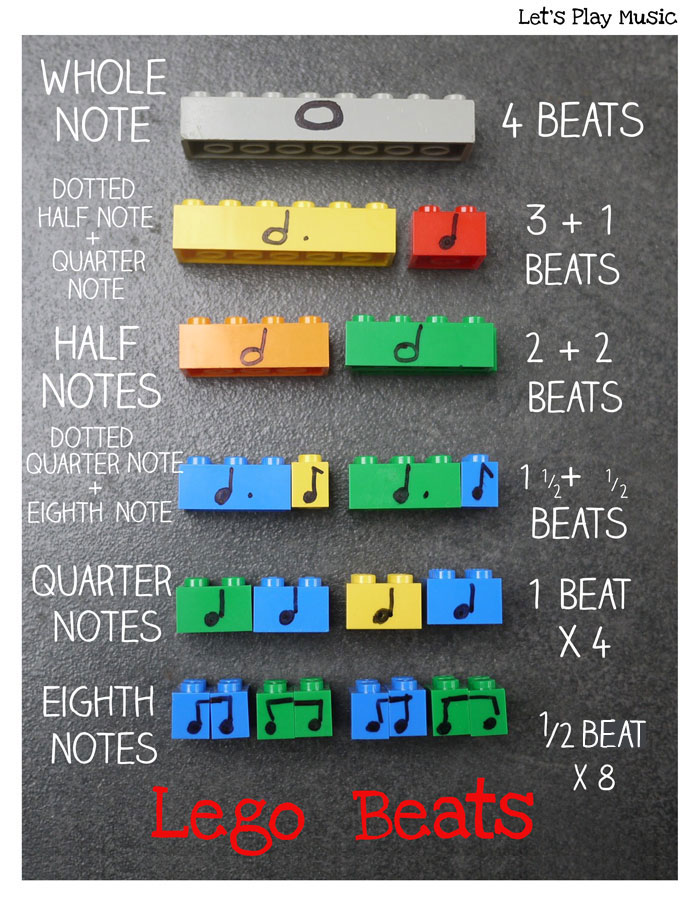 1. Have you ever created music using Lego? Use the different sizes and colours of the bricks to create Figurenotes tunes. You can then develop this activity to learn rhythm in standard notation. Maths teachers have been using this method for years!
Did you know that you can buy individual lego bricks? This means you can create a pack directly suited to your needs. All the Figurenotes colours are available from the lego site, just make sure to order all the different sizes you’ll need. This is a great way to teach dotted rhythms, key signatures, and general rhythm reading skills in both Figurenotes and standard notation. You could always put a call out for unused Lego in your local community too.
There are some great templates for Lego music making on Pinterest.
You could create some card versions, either large for whole class work, or small for individuals and small groups. If your pupils are young or have difficulties with motor skills, you might want to start with Duplo.
2. Poly-pockets – you know, those transparent, plastic pockets used in ring-binders – make great miniature whiteboards. Pop a worksheet or empty score inside and use dry-wipe markers to fill them in. You can get dry-wipe markers in Figurenotes colours from IKEA if you want to create a tune or use colour within the worksheet. These poly-pockets can then be wiped clean, ready for the next pupil/class. If possible, it would be amazing to have small magnetic whiteboards for each pupil, but this is a good standby for when budgets are tight.
If you want to share your pupils’ tunes, you can take photos of them and project them using Powerpoint for the whole class to play.
What are the learning points you would like us to create worksheets for? Let us know in the Facebook group: Figurenotes – Let’s Make Music. We want to put many more up in the Resource Base and want them to be relevant to you.
3. Art Attack! You will need: paper plates, masking tape, paints in Figurenotes colours.
There are so many games you can play using just these items, which can then progress further into note naming and reading standard notation. Take a look in the Resource Base, under ‘General’, for the Progression Games sheet. We love games and think they offer brilliant stealth learning opportunities.
Paint the paper plates in Figurenotes colours – you can either keep them as circles, or cut them to the desired shape. Lay out a Figurenotes score using the masking tape, either on the floor or a table. Start with 4 bars and see if you can compose a tune using your paper plates. Try playing this tune on your instrument.
You can take it to stage 2 by creating a masking tape stave and placing the plates in the appropriate places. Turn this into a quiz or a composition exercise. To take it to stage 3, write the note names on the back of the plates. Place them in the correct positions with the coloured side up. Then get your pupils to name the note before turning the plate over to see if they were correct.
Let us know what other games you would play using these items in the Facebook group: Figurenotes – Let’s Make Music
1. Have you ever created music using Lego? Use the different sizes and colours of the bricks to create Figurenotes tunes. You can then develop this activity to learn rhythm in standard notation. Maths teachers have been using this method for years!
Did you know that you can buy individual lego bricks? This means you can create a pack directly suited to your needs. All the Figurenotes colours are available from the lego site, just make sure to order all the different sizes you’ll need. This is a great way to teach dotted rhythms, key signatures, and general rhythm reading skills in both Figurenotes and standard notation. You could always put a call out for unused Lego in your local community too.
There are some great templates for Lego music making on Pinterest.
You could create some card versions, either large for whole class work, or small for individuals and small groups. If your pupils are young or have difficulties with motor skills, you might want to start with Duplo.
2. Poly-pockets – you know, those transparent, plastic pockets used in ring-binders – make great miniature whiteboards. Pop a worksheet or empty score inside and use dry-wipe markers to fill them in. You can get dry-wipe markers in Figurenotes colours from IKEA if you want to create a tune or use colour within the worksheet. These poly-pockets can then be wiped clean, ready for the next pupil/class. If possible, it would be amazing to have small magnetic whiteboards for each pupil, but this is a good standby for when budgets are tight.
If you want to share your pupils’ tunes, you can take photos of them and project them using Powerpoint for the whole class to play.
What are the learning points you would like us to create worksheets for? Let us know in the Facebook group: Figurenotes – Let’s Make Music. We want to put many more up in the Resource Base and want them to be relevant to you.
3. Art Attack! You will need: paper plates, masking tape, paints in Figurenotes colours.
There are so many games you can play using just these items, which can then progress further into note naming and reading standard notation. Take a look in the Resource Base, under ‘General’, for the Progression Games sheet. We love games and think they offer brilliant stealth learning opportunities.
Paint the paper plates in Figurenotes colours – you can either keep them as circles, or cut them to the desired shape. Lay out a Figurenotes score using the masking tape, either on the floor or a table. Start with 4 bars and see if you can compose a tune using your paper plates. Try playing this tune on your instrument.
You can take it to stage 2 by creating a masking tape stave and placing the plates in the appropriate places. Turn this into a quiz or a composition exercise. To take it to stage 3, write the note names on the back of the plates. Place them in the correct positions with the coloured side up. Then get your pupils to name the note before turning the plate over to see if they were correct.
Let us know what other games you would play using these items in the Facebook group: Figurenotes – Let’s Make Music
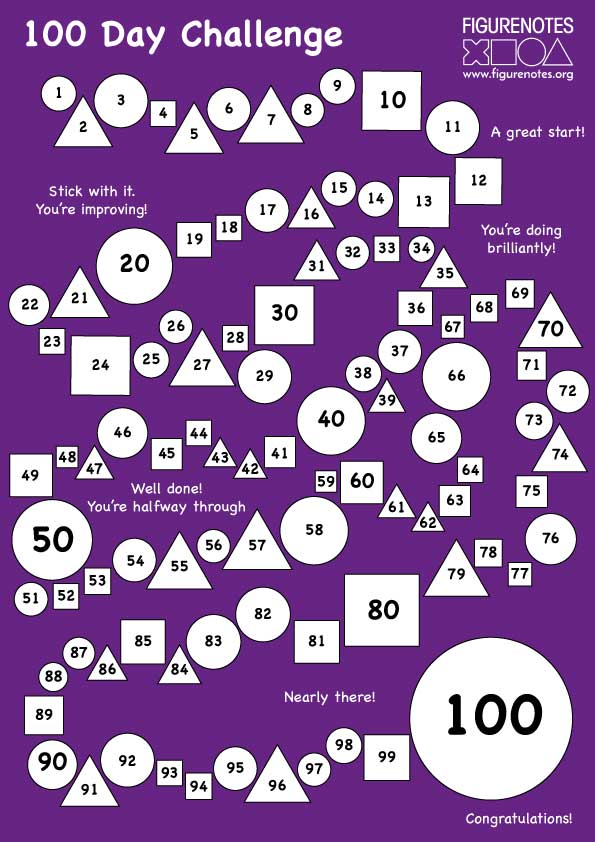 4. 100 Day Practice Challenge – All of my pupils love a challenge, when presented to them as such. If it is just a hard thing to do, then they aren’t playing ball, but as soon as it is a ‘challenge’, they are motivated to try. In order to build good habits and develop practice skills, we need to encourage pupils to practise consistently. The 100 Day Practice Challenge can be a great incentive to build those skills. You can do this in smaller chunks, should you or your pupils prefer, breaking it down to a week to start with and then develop from there. Some teachers create charts or use apps to record the practice sessions. Put landmarks within the timeline, such as gaining a sticker on your chart at 25 days. It is useful to have ideas for practice focus, as well as things to practise when you are away from your instrument. You could even make this competitive within your classroom or studio.
Use one of the Figurenotes 100 Day Challenge maps or create your own. Colour in each shape in a Figurenotes colour to show you have completed your practice for that day. Get a sticker from your teacher every time you reach a number ending in zero. There is a bundle of sheets on the Resource Base, including 2 types of chart and some practice ideas for when you are with and without an instrument – so holidays won’t get in the way of you achieving your goal! Take a look in the Worksheets section.
Not a member of the Resource Base? Get unlimited downloads for a whole year for just £23.99. You also get a discount on our award-winning training days. The next Music Teacher’s Toolbox training is on Saturday 18th November, 2017. Book now!
4. 100 Day Practice Challenge – All of my pupils love a challenge, when presented to them as such. If it is just a hard thing to do, then they aren’t playing ball, but as soon as it is a ‘challenge’, they are motivated to try. In order to build good habits and develop practice skills, we need to encourage pupils to practise consistently. The 100 Day Practice Challenge can be a great incentive to build those skills. You can do this in smaller chunks, should you or your pupils prefer, breaking it down to a week to start with and then develop from there. Some teachers create charts or use apps to record the practice sessions. Put landmarks within the timeline, such as gaining a sticker on your chart at 25 days. It is useful to have ideas for practice focus, as well as things to practise when you are away from your instrument. You could even make this competitive within your classroom or studio.
Use one of the Figurenotes 100 Day Challenge maps or create your own. Colour in each shape in a Figurenotes colour to show you have completed your practice for that day. Get a sticker from your teacher every time you reach a number ending in zero. There is a bundle of sheets on the Resource Base, including 2 types of chart and some practice ideas for when you are with and without an instrument – so holidays won’t get in the way of you achieving your goal! Take a look in the Worksheets section.
Not a member of the Resource Base? Get unlimited downloads for a whole year for just £23.99. You also get a discount on our award-winning training days. The next Music Teacher’s Toolbox training is on Saturday 18th November, 2017. Book now!